
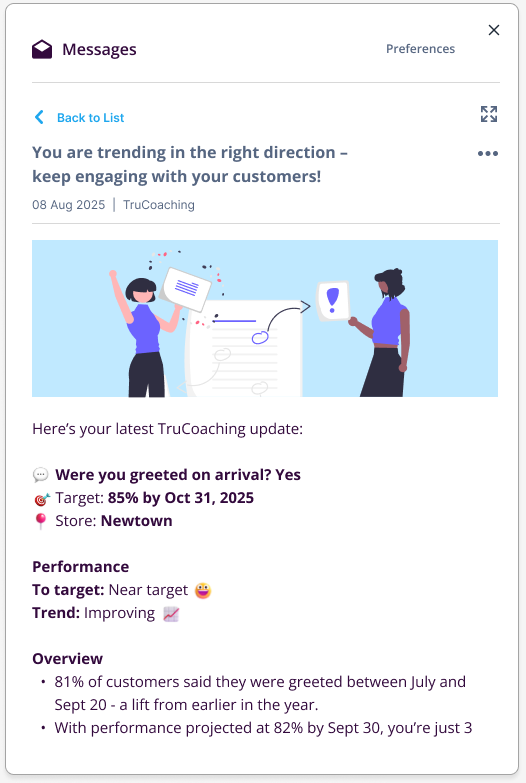
Once the target period commences for a given target record such that the record becomes "Active", a progress update is delivered on a weekly basis thereafter.
This includes the target info, an indication of progress towards the target and coaching advice personalised to the specific outlet.
Who receives these updates?
Any user that has the permission to view the data for the outlet in question will receive the progress update and coaching summary.
Where is the update delivered?
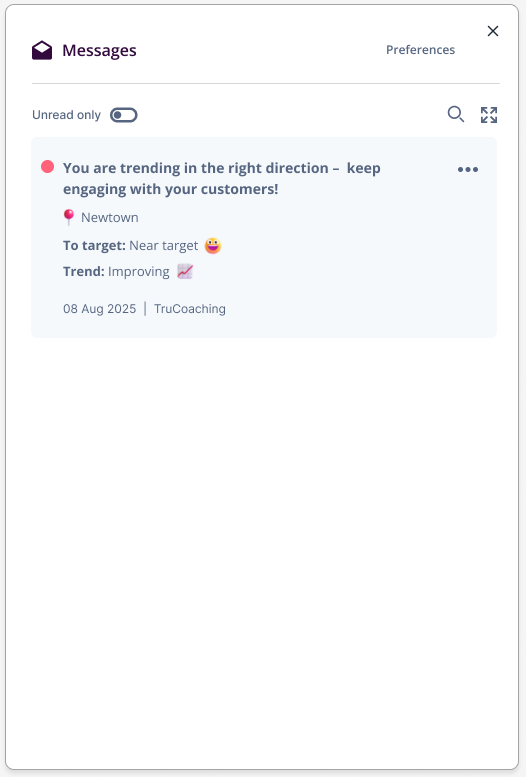
Updates are made available in the "Messages" panel of TruHub, accessed via the envelope icon in the main header. A new message is indicated by a red dot appearing above the icon.

The Messages panel works just like an inbox, where you can see your read and unread message headers and click through to view the full content.
Can I stop receiving these updates?
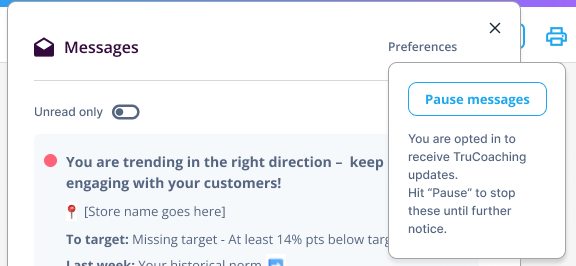
If, for example, you are receiving progress updates in TruHub due to your data permissions but aren’t directly responsible for the specific outlet, it’s easy to pause them.
Open the "Messages" panel from the TruHub product header, select "Preferences" and then choose "Pause".
You may choose to resume at any time. Open the "Messages" panel again from the TruHub product header, select "Preferences" and then choose "Resume".
You will then begin to receive subsequent progress updates.
Note that you will not receive backdated progress updates from the period during which these were paused.