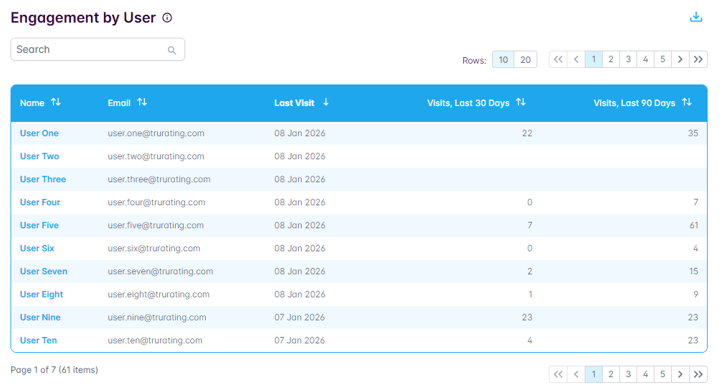
Users with the Admin role are able to view overall and per-user engagement information.
To view the engagement data:
- navigate to the Account Admin section
- select User Engagement
From here there are two tabs, as follows:
Overall
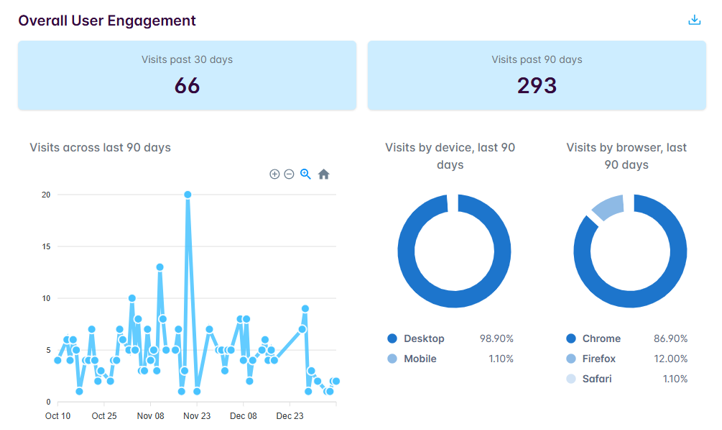
Here you can view aggregated information, including:
- Total TruHub visits in past 30 days
- Total TruHub visits in past 90 days
- TruHub visit trend across last 90 days
- TruHub visits in last 90 days by device and browser
You can also choose to export this data via the download icon.
By User
In this tab you can view, on a user by user basis:
- Total TruHub visits in past 30 days
- Total TruHub visits in past 90 days
- Date of last TruHub visit
You can also choose to export this data via the download icon.